加载中…
创作者 · MotionSites
查看原始来源 ↗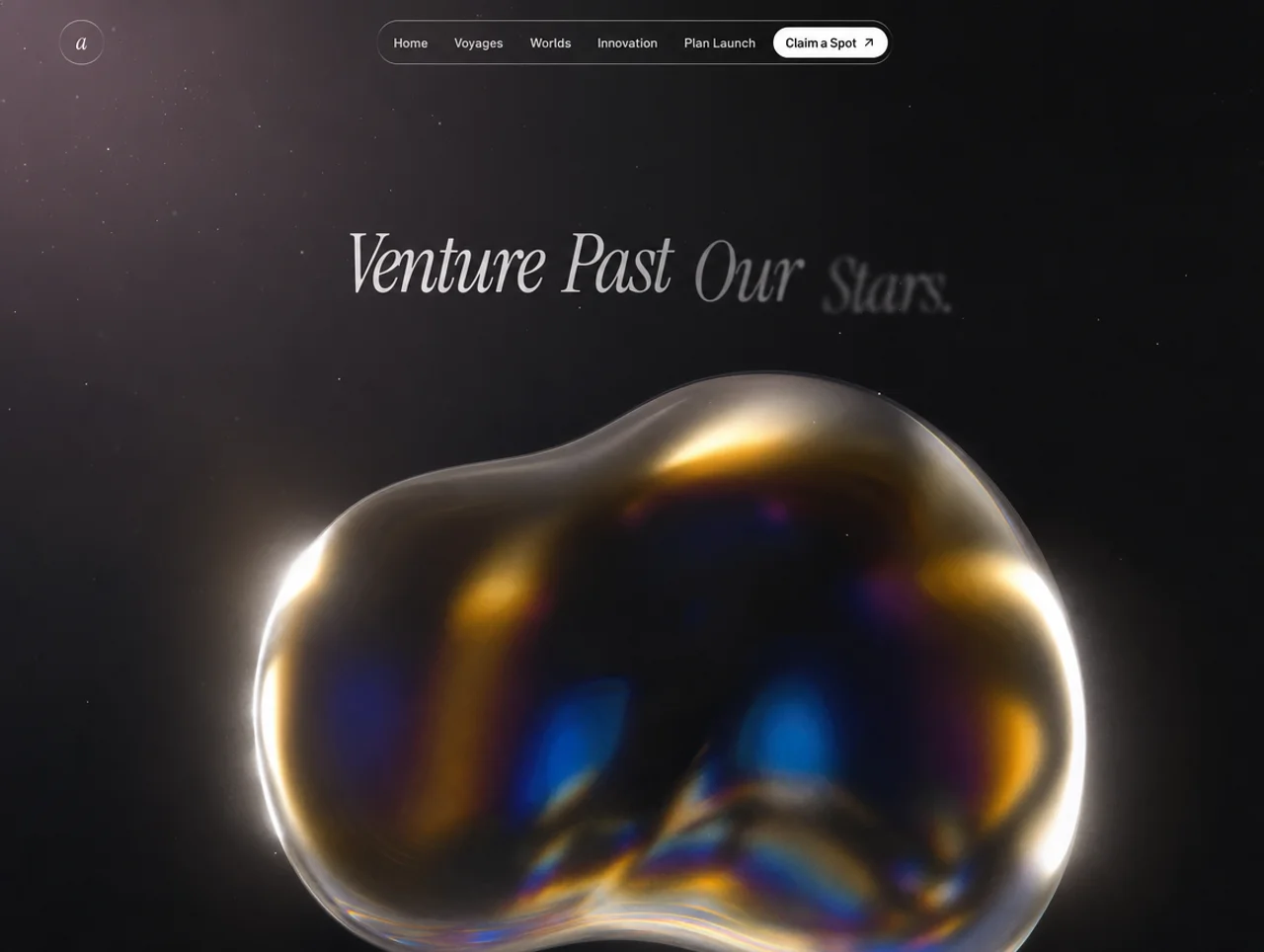
Prompt
构建提示词:电影感太空旅行落地页
构建一个单页落地网站,包含两个全屏高度区块(Hero + Capabilities)。两个区块都使用循环背景视频,通过自定义 JS 实现 crossfade,并共享一套 liquid-glass 设计系统和 Framer Motion 入场动画。

技术栈(固定版本,仅 CDN)
<script src="https://cdn.tailwindcss.com"></script>
<script src="https://unpkg.com/react@18.3.1/umd/react.development.js" integrity="sha384-hD6/rw4ppMLGNu3tX5cjIb+uRZ7UkRJ6BPkLpg4hAu/6onKUg4lLsHAs9EBPT82L" crossorigin="anonymous"></script>
<script src="https://unpkg.com/react-dom@18.3.1/umd/react-dom.development.js" integrity="sha384-u6aeetuaXnQ38mYT8rp6sbXaQe3NL9t+IBXmnYxwkUI2Hw4bsp2Wvmx4yRQF1uAm" crossorigin="anonymous"></script>
<script src="https://unpkg.com/@babel/standalone@7.29.0/babel.min.js" integrity="sha384-m08KidiNqLdpJqLq95G/LEi8Qvjl/xUYll3QILypMoQ65QorJ9Lvtp2RXYGBFj1y" crossorigin="anonymous"></script>
<script src="https://unpkg.com/framer-motion@11.11.17/dist/framer-motion.js"></script>
<script>window.Motion = window.FramerMotion;</script>
Body 的 bg:#000。页面是挂载在 #root 上的 React 应用,所有组件都是 <script type="text/babel"> 文件,并通过 window.X = X 导出。

字体
Google Fonts:

family=Instrument+Serif:ital@0;1&family=Barlow:wght@300;400;500;600
Tailwind config 添加:

font-heading → 'Instrument Serif', serif(使用时始终为 italic)
font-body → 'Barlow', sans-serif
覆盖默认 border radius:DEFAULT: "9999px"(因此单独使用 rounded → pill)。

Liquid-glass 工具类(必须使用以下精确 CSS,放在 <style> block 中)
两个变体——.liquid-glass(轻微效果,用于 nav/chips/cards)和 .liquid-glass-strong(模糊更强,用于主 CTA):

.liquid-glass {
background: rgba(255,255,255,0.01);
background-blend-mode: luminosity;
backdrop-filter: blur(4px);
-webkit-backdrop-filter: blur(4px);
border: none;
box-shadow: inset 0 1px 1px rgba(255,255,255,0.1);
position: relative;
overflow: hidden;
}
.liquid-glass::before {
content: "";
position: absolute; inset: 0;
border-radius: inherit;
padding: 1.4px;
background: linear-gradient(180deg,
rgba(255,255,255,0.45) 0%,
rgba(255,255,255,0.15) 20%,
rgba(255,255,255,0) 40%,
rgba(255,255,255,0) 60%,
rgba(255,255,255,0.15) 80%,
rgba(255,255,255,0.45) 100%);
-webkit-mask: linear-gradient(#fff 0 0) content-box, linear-gradient(#fff 0 0);
-webkit-mask-composite: xor;
mask-composite: exclude;
pointer-events: none;
}
.liquid-glass-strong { /* 与上面相同,但改为: */
backdrop-filter: blur(50px);
box-shadow: 4px 4px 4px rgba(0,0,0,0.05), inset 0 1px 1px rgba(255,255,255,0.15);
}
.liquid-glass-strong::before { /* 与上面相同,但 stops 为 0.5 / 0.2 / 0 / 0 / 0.2 / 0.5 */ }
FadingVideo 组件(自定义 JS crossfade,不使用 CSS transitions)
包裹一个从 opacity: 0 开始的 <video autoPlay muted playsInline preload="auto">。行为:

FADE_MS = 500,FADE_OUT_LEAD = 0.55 秒。
fadeTo(target, duration) 使用 requestAnimationFrame;从 http://video.style.opacity 读取当前 opacity,使每次新 fade 都从上一次停止的位置继续。每次调用都会先对上一个 rAF id 调用 cancelAnimationFrame,再开始新动画。
在 loadeddata 时:将 opacity 设为 0,调用 play(),再调用 fadeTo(1)。
在 timeupdate 时:如果 fadingOutRef 尚未设置,且 duration - currentTime <= 0.55 并且 > 0,则切换该 ref 并调用 fadeTo(0)。
在 ended 时:将 opacity 设为 0;经过 setTimeout(100ms) 后,将 currentTime 重置为 0,调用 play(),清除 fadingOutRef,再调用 fadeTo(1)。
关闭 loop attribute(通过 ended 手动实现循环)。
组件 unmount 时清理:取消 rAF,移除 listeners。
区块 1 — Hero(全 viewport,黑色 bg)
背景视频(120% width/height,顶部对齐,水平居中——焦点位于画面顶部):

src: https://d8j0ntlcm91z4.cloudfront.net/user_38xzZboKViGWJOttwIXH07lWA1P/hf_20260418_080021_d598092b-c4c2-4e53-8e46-94cf9064cd50.mp4
class: absolute left-1/2 top-0 -translate-x-1/2 object-cover object-top z-0
style: { width: "120%", height: "120%" }
不添加 overlay。z-10 layer 包含:Navbar → Hero 内容(flex-1,居中)→ Partners。

Navbar(fixed top-4、px-8 / lg:px-16、z-50)
左侧:48×48 liquid-glass 圆形,内含 italic serif 小写字母“a”(Instrument Serif)。
中间(仅 desktop):liquid-glass pill,px-1.5 py-1.5,包含 5 个文本链接——首页、航程、世界、创新、规划发射——每个均为 px-3 py-2 text-sm font-medium text-white/90 font-body。后面跟一个白色 pill 按钮“抢占席位”+ ArrowUpRight icon(bg-white text-black、whitespace-nowrap)。
右侧:48×48 不可见 spacer,用于平衡 logo。
Hero 内容(居中,pt-24 px-4)
全部使用 Framer Motion 制作动画,initial: {filter: blur(10px), opacity: 0, y: 20},easeOut。

Badge(delay 0.4s):liquid-glass rounded-full pill。包含白色 pill chip“最新”(bg-white text-black px-3 py-1 text-xs font-semibold)+ 文本“首次载人火星航程将于 2026 年抵达”(text-sm text-white/90、pr-3)。
Headline — BlurText 组件(逐词动画,见下文)。文本:“越过我们的天空,探索整个宇宙”。Classes: text-6xl md:text-7xl lg:text-[5.5rem] font-heading italic text-white leading-[0.8] max-w-2xl justify-center tracking-[-4px]。
Subheading(delay 0.8s、mt-4 text-sm md:text-base text-white max-w-2xl font-body font-light leading-tight):“以前所未有的方式探索宇宙。我们的先锋飞船与突破性工程,让深空探索触手可及——安全而非凡。”
CTA(delay 1.1s、flex items-center gap-6 mt-6):
主按钮:liquid-glass-strong rounded-full px-5 py-2.5 text-sm font-medium text-white,包含“开启你的航程”+ ArrowUpRight(h-5 w-5)。
次按钮:纯文本链接,“观看升空”+ Play icon(h-4 w-4、filled)。
Stats row(delay 1.3s、flex items-stretch gap-4 mt-8):两张 liquid-glass cards,p-5 w-[220px] rounded-[1.25rem],每张包含:
顶部:白色 28×28 outline SVG icon(card 1 为 clock,card 2 为 globe)。
底部:Instrument Serif italic 白色大数字(text-4xl tracking-[-1px] leading-none):“34.5 分钟”/“2.8B+”。下方 Label(text-xs text-white font-body font-light mt-2):“视频平均观看时长”/“全球用户”。
Partners(Hero 底部,delay 1.4s)
flex flex-col items-center gap-4 pb-8:

liquid-glass rounded-full chip(px-3.5 py-1 text-xs font-medium text-white):“与全球顶尖航空航天先驱合作”。
一行 5 个名称,使用 Instrument Serif italic white、text-2xl md:text-3xl tracking-tight、gap-12/md:gap-16:Aeon · Vela · Apex · Orbit · Zeno。
BlurText 组件(逐词 blur-in)
IntersectionObserver 在可见度达到 10% 时触发。按空格拆分文本。每个单词都是 motion.span,配置如下:

initial: {filter: 'blur(10px)', opacity: 0, y: 50}
使用 3-step keyframes 动画至 {filter: 'blur(5px)', opacity: 0.5, y: -5} → {filter: 'blur(0px)', opacity: 1, y: 0}
duration: 0.7(stepDuration 0.35 × 2),times: [0, 0.5, 1],ease: easeOut
Stagger: delay = (i * 100) / 1000 秒
display: inline-block,marginRight: 0.28em(不要使用 non-breaking-space——letter-spacing -4px 会吞掉 nbsp)。
父级 <p> 的样式为 display: flex; flexWrap: wrap; justifyContent: center; rowGap: 0.1em。
区块 2 — Capabilities(min-h-screen,黑色 bg)
背景视频(full-bleed,不使用 120% scale):

src: https://d8j0ntlcm91z4.cloudfront.net/user_38xzZboKViGWJOttwIXH07lWA1P/hf_20260418_094631_d30ab262-45ee-4b7d-99f3-5d5848c8ef13.mp4
class: absolute inset-0 w-full h-full object-cover z-0
使用相同的 FadingVideo 处理方式。不添加 overlay。

内容(relative z-10 px-8 md:px-16 lg:px-20 pt-24 pb-10 flex flex-col min-h-screen):

Header(mb-auto):

Kicker: text-sm font-body text-white/80 mb-6 → // 能力
Heading: font-heading italic text-white text-6xl md:text-7xl lg:text-[6rem] leading-[0.9] tracking-[-3px]:
制作方式
全面进化
(两行,中间使用 <br/>)。
三张 cards(grid grid-cols-1 md:grid-cols-3 gap-6 mt-16):每张都是 liquid-glass rounded-[1.25rem] p-6 min-h-[360px] flex flex-col。

每张 card 的顶部行(flex items-start justify-between gap-4):

左侧:44×44 嵌套 liquid-glass 方形(rounded-[0.75rem]),内含白色 Material Icons SVG(fill currentColor、h-6 w-6 text-white)。使用任意 Material icons——这里使用以下三个:
AI 场景:image icon — path M5 21q-.825 0-1.412-.587T3 19V5q0-.825.588-1.412T5 3h14q.825 0 1.413.588T21 5v14q0 .825-.587 1.413T19 21H5Zm1-4h12l-3.75-5-3 4L9 13l-3 4Z
批量制作:movie icon — path M4 6.47 5.76 10H20v8H4V6.47M22 4h-4l2 4h-3l-2-4h-2l2 4h-3l-2-4H8l2 4H7L5 4H4c-1.1 0-1.99.89-1.99 2L2 18c0 1.1.9 2 2 2h16c1.1 0 2-.9 2-2V4Z
智能照明:lightbulb icon — path M9 21c0 .55.45 1 1 1h4c.55 0 1-.45 1-1v-1H9v1Zm3-19C8.14 2 5 5.14 5 9c0 2.38 1.19 4.47 3 5.74V17c0 .55.45 1 1 1h6c.55 0 1-.45 1-1v-2.26c1.81-1.27 3-3.36 3-5.74 0-3.86-3.14-7-7-7Z
右侧:flex flex-wrap justify-end gap-1.5 max-w-[70%]——4 个小型 liquid-glass pill tags(rounded-full px-3 py-1 text-[11px] text-white/90 font-body whitespace-nowrap):
Card 1:自然情境 · 照片级真实感 · 无限场景 · 生态氛围
Card 2:快速扩展 · 视觉一致性 · 节省时间 · 随时可发布
Card 3:光线追踪 · 物理阴影 · 影棚级品质 · 阳光同步
中部:flex-1 spacer。

每张 card 的底部(mt-6):

Title h3: font-heading italic text-white text-3xl md:text-4xl tracking-[-1px] leading-none——“AI 场景”/“批量制作”/“智能照明”
Body p(mt-3 text-sm text-white/90 font-body font-light leading-snug max-w-[32ch]):
“AI 分析你的产品,创造难辨真假的自然环境——从冰岛悬崖到雾气弥漫的森林。”
“在几分钟内为整个产品线完成风格设计。无需数周修图,即可为产品目录和社交媒体打造统一的视觉形象。”
“自动调整照明与材质。通过逼真的阴影和阳光,实现无瑕融合。”
Icons(inline lucide-style SVGs,currentColor stroke)
ArrowUpRight: 24×24,M7 17L17 7 + M7 7h10v10,strokeWidth 2,round caps。
Play: 24×24 filled polygon 6 4 20 12 6 20 6 4。
注意事项
所有文本均为白色;不使用绿色,不使用渐变背景。
视频上不使用 CSS transitions——fade 必须按照 FadingVideo 规范由 rAF 驱动。
视频采用 full-bleed 且不添加深色 overlay;对比度来自 liquid-glass chrome。
可以使用 console.error filter wrapper 屏蔽 Framer Motion 关于 list keys 的开发警告——这些警告无害。
以上详细提示词涵盖了所有元素、样式、动画、视频 URL 和字体,可精确复刻该落地页。适用模型与稳定度
建议模型
继续探索

@Oluwaphilemon1 使用 Claude Fable 5 · Three.js · Blender · GSAP完成的网页案例,包含公开结果、完整 Prompt 与原始来源。
提示语
Claude Fable 5 和 GPT-5.6 很强🥵🥵🥵 下面是我如何使用 Claude 构建的 👇 提示词:「设计一个机构网站,把服务以 3D 超市商品包装的形式呈现」 使用 Three.js 和 WebGL 在浏览器中实时渲染所有产品 使用 Blender 制作包装模型,然后导出为 GLTF 以加载到 Three.js 中 使用 GSAP 实现流畅的产品旋转和悬停交互 如果你想做一个让客户感觉像是在购买高级商品的作品集,请保存这条 🛒
复制这段 TSX 组件源码,交给 Cursor、v0、Claude 等 AI 编程工具,说明这是「3D Animated Pin」的 Aceternity UI 组件实现,即可让它接入你的 React 项目,再按需替换文案、配色与触发参数复用。
提示语
// components/ui/3d-pin.tsx "use client"; import React, { useState } from "react"; import { motion } from "motion/react"; import { cn } from "@/lib/utils"; export const PinContainer = ({ children, title, href, className, containerClassName…

提示语
首先搜索 "/unlazy" skill,完整阅读它,并在整个任务中持续使用。 将此视为一项至少持续 {argument name="minimum duration" default="5 小时"} 的大型视觉构建。如果环境允许,最好进行 {argument name="optimal duration" default="8–24 小时"} 有实质意义的实现和迭代。不要在制作出一个还不错的场景后就停下。 在浏览器中创建一个细节极其丰富的实时 {argument nam

