

加载中…
创作者 · MotionSites
查看原始来源 ↗复刻提示词保留原文,另附运行环境、素材与验收要求;附加说明不是原作者原话。
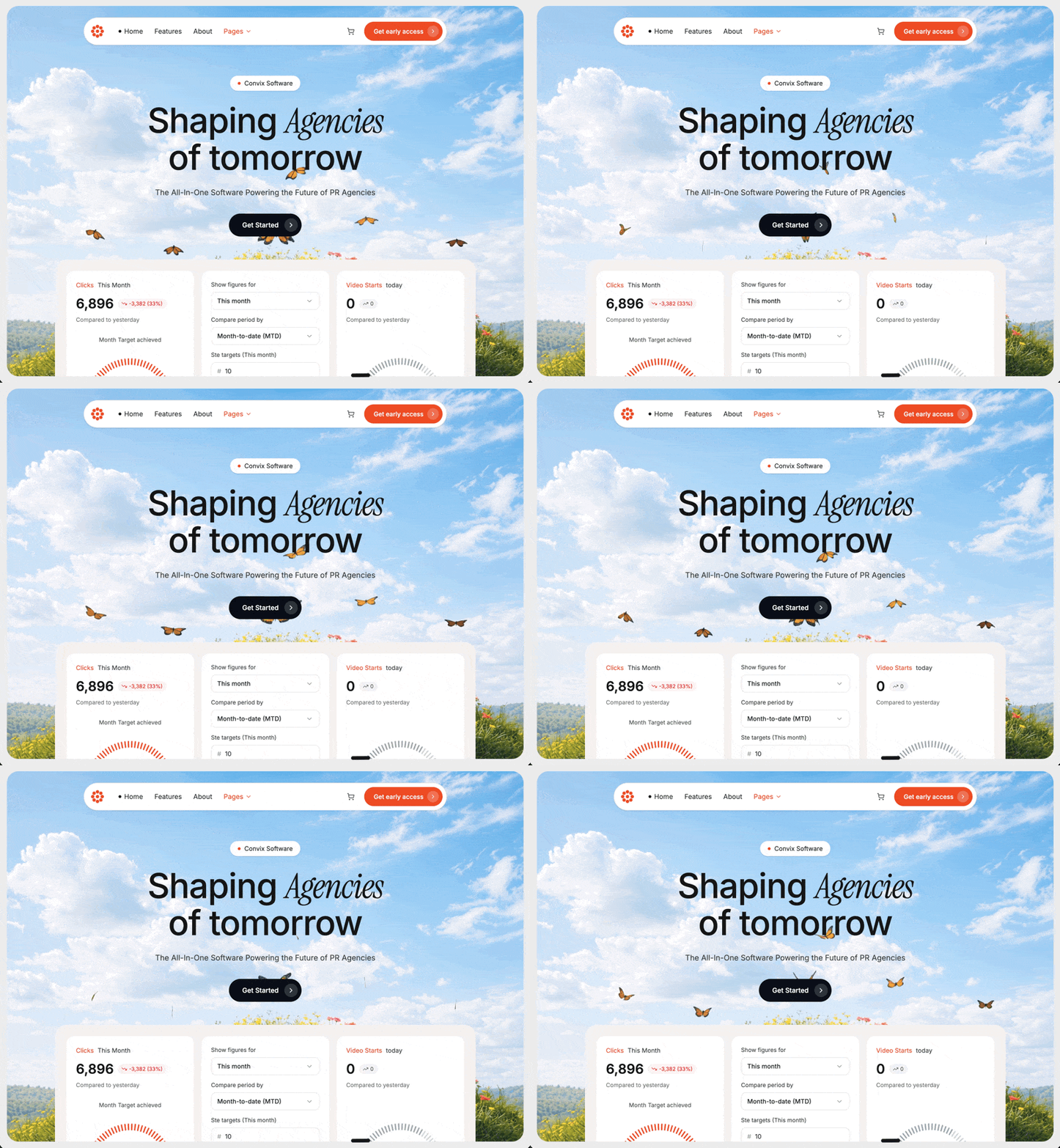
为一家名为 "Convix Software" 的公关代理机构 SaaS 构建一个完全响应式、占满整个视口的 hero section,严格遵循以下规格:

页面框架
外层 wrapper:min-h-screen w-full bg-[#ededed] p-3 sm:p-4,font-family Inter
Hero container(裁剪内部所有内容):relative w-full h-[calc(100vh-24px)] sm:h-[calc(100vh-32px)] overflow-hidden bg-[#d9d9d9] rounded-2xl sm:rounded-3xl
背景视频
URL:https://d8j0ntlcm91z4.cloudfront.net/user_38xzZboKViGWJOttwIXH07lWA1P/hf_20260424_064411_9e9d7f84-9277-41f4-ab10-59172d89e6be.mp4
绝对定位,inset-0 w-full h-full object-cover pointer-events-none
属性:autoPlay、loop、muted、playsInline、preload="auto"、disableRemotePlayback、webkit-playsinline="true"、x5-playsinline="true"
Poster fallback:https://images.unsplash.com/photo-1557683316-973673baf926?w=1600&q=60
视频上方:absolute inset-0 bg-white/10 overlay
前景内容 wrapper:relative z-10
字体(/src/styles/fonts.css)
从 Google Fonts 导入:

Inter 字重 400、500、600、700
Instrument Serif regular + italic
Navbar(悬浮胶囊,响应式并带 hamburger)
Wrapper:flex justify-center pt-4 sm:pt-6 px-3 sm:px-4
胶囊:bg-white rounded-full shadow-sm border border-neutral-200 pl-2 pr-2 py-2 w-full max-w-[760px] relative
Logo(左侧,shrink-0):橙色 #ef4d23 的 8 瓣花朵 SVG——围绕中心 (16,16) 以 radius 10 排列 8 个圆,再加一个中心圆,全部 r=3.5,viewBox 32×32,渲染为 w-7 h-7 sm:w-8 sm:h-8
桌面端链接(hidden md:flex、gap-6、14px):"首页"(带 1.5px 黑点)、"功能"、"关于"、"页面"(#ef4d23 + ChevronDown 3.5)
右侧组合(ml-auto):ShoppingCart icon(移动端隐藏),然后是橙色 #ef4d23 rounded-full 按钮 "抢先体验"(桌面端)/ "抢先体验"(移动端),其 white/20 内圆中放置 ChevronRight
仅移动端显示 Menu (lucide) hamburger 按钮(md:hidden)
打开时:dropdown panel absolute top-full left-2 right-2 mt-2 bg-white rounded-2xl shadow-lg border border-neutral-200 p-3 z-20,纵向列出相同的 nav items
使用 useState open 切换菜单
Hero 内容(居中)
flex flex-col items-center px-4 pt-10 sm:pt-16 pb-8 sm:pb-12 text-center
Badge:inline-flex items-center gap-2 bg-white rounded-full px-4 py-1.5 shadow-sm,13px——橙色圆点 + "Convix Software"
Headline <h1> 使用 inline style fontSize: clamp(36px, 8vw, 72px); lineHeight: 1.05; fontWeight: 500; letterSpacing: -0.02em,mt-5 sm:mt-6 max-w-4xl:
"塑造" + <span style={{fontFamily:"'Instrument Serif', serif", fontStyle:"italic", fontWeight:400}}>代理机构</span> + <br> + "的未来"
Subtitle <p> mt-4 sm:mt-6 text-neutral-700 px-2,fontSize: clamp(13px, 3.5vw, 16px):"驱动公关代理机构未来的一体化软件"
CTA button mt-6 sm:mt-8 inline-flex items-center gap-3 bg-[#0b0f1a] text-white rounded-full pl-6 sm:pl-7 pr-2 py-2 sm:py-2.5,14px:"开始使用" + w-6 h-6 sm:w-7 sm:h-7 rounded-full bg-white/15,其中包含 ChevronRight(4×4)
Dashboard 预览
Wrapper:bg-[#f5f2ee] rounded-3xl p-4 sm:p-6 w-full max-w-[880px] mx-auto
Grid:grid grid-cols-1 sm:grid-cols-2 lg:grid-cols-3 gap-3 sm:gap-4
其外层 container:px-3 sm:px-4
Card 1 — 点击量(白色、rounded-2xl、p-5)
Header:橙色 "点击量" + 中性色 "本月"(13px)
大号数字 "6,896"(28px,weight 600)+ 红色胶囊 bg-red-50 text-red-600 rounded-full px-2 py-0.5,带 TrendingDown icon 和 "-3,382 (33%)"(11px)
小号说明 "与昨天相比"
居中的 "已完成月度目标" label
Gauge 在 92% 处使用 #ef4d23,两端 labels 为 "389K" / "425K"
底部切换胶囊:bg-neutral-100 rounded-full p-1 flex——"展示次数" 为 active(白色卡片 + 阴影)/ "点击量" 为 inactive
Card 2 — 表单(白色、rounded-2xl、p-5、flex flex-col gap-3)
两组 label+dropdown(label 12px neutral-700,button bordered rounded-lg px-3 py-2,带 ChevronDown):
"显示以下时间的数字" → "本月"
"对比周期" → "本月至今 (MTD)"
两组带 # prefix 的 label+input:
"设置目标(本月)" → 10
"设置目标(今年)" → 100
Footer:橙色 #ef4d23 "保存" button(rounded-lg px-5 py-2)、带下划线的 "取消"、推至右侧的 X icon(ml-auto)
Card 3 — 视频开始播放量(白色、rounded-2xl、p-5)
Header:橙色 "视频开始播放量" + "今天"
大号 "0" + 带 TrendingUp 和 "0" 的中性色胶囊
"与昨天相比"
Gauge 在 68% 处使用 #9ca3af(无两端 labels)
切换胶囊:"视频点击量" 为 active / "视频开始播放量"
Gauge Component(可复用)
Props:value、color="#ef4d23"、showLabels、min、max
SVG viewBox 0 0 200 120,max-width 260px
40 个 tick marks 横跨 180° arc(起始 angle π,扫至 2π);active count = round(value/100 * 40)
每个 tick:<line> 从 radius (r-10) 延伸到 r=80,围绕中心 (100,100),strokeWidth=2.5,strokeLinecap="round";active 使用 color,inactive 使用 #d4d4d8
中心文本:<text x=100 y=105 textAnchor="middle">{value}%</text>,fontSize 22,fontWeight 600
如果 showLabels:在 SVG 下方显示小号 flex row,11px neutral-500,justify-between,展示 min 和 max
颜色
主橙色:#ef4d23
深色 CTA:#0b0f1a
页面 bg:#ededed;hero bg:#d9d9d9;dashboard tray:#f5f2ee
Icons(lucide-react)
ChevronDown、ChevronRight、ShoppingCart、Menu、TrendingDown、TrendingUp、X

文件结构
src/app/App.tsx
src/app/components/Navbar.tsx
src/app/components/DashboardPreview.tsx
src/app/components/Gauge.tsx
src/styles/fonts.css
行为
无自定义 animations;仅使用原生循环静音背景视频
整个 hero(视频 + 内容 + dashboard)由同一个圆角 container 一并裁剪,因此 dashboard cards 会溢出底部边缘
完全响应式:navbar 在 md 以下折叠为 hamburger,headline/CTA 通过 clamp() 缩放,dashboard grid 按 1 → 2 → 3 列变化适用模型与稳定度
建议模型
多人复现
继续探索

暗色编程教育平台 hero,规格逐条编号写死,从背景布局到响应式断点不留发挥空间,适合学怎么把设计稿翻译成可执行规格。
提示语
使用 React 和 Tailwind CSS,为名为“CodeNest”的编程教育平台创建一个高端深色主题的 hero section。设计必须响应式,并严格遵循以下规范: 1. 背景与布局: 背景:使用以下 HLS stream 实现全屏背景视频:https://stream.mux.com/tLkHO1qZoaaQOUeVWo8hEBeGQfySP02EPS02BmnNFyXys.m3u8。使用 hls.js,并设置 enableWorker: false,以确保在

提示语
为 AI 网站构建器创建一个深色模式 Hero 区块,严格遵循以下规格: ## 技术设置 ### 必需的软件包 安装以下软件包: - `motion`(版本 12.23.24 或更高)——用于动画 - `hls.js`(版本 1.6.15 或更高)——用于视频流播放 - `lucide-react`(版本 0.487.0 或更高)——用于图标 ### 字体 导入以下 Google Fonts: ```css @import url('https://fonts.goog

订阅制创意机构 Alwayzz 的落地 hero,React + Vite,样式刻意用自定义 CSS,避开 Tailwind 工具类。
提示语
**使用 React + Vite + Tailwind CSS,为名为 "Alwayzz" 的创意机构创建一个单页落地页 hero section。所有样式均使用自定义 CSS(不要使用 Tailwind utilities)。设计应简约、干净、采用黑白配色,并始终使用紧凑的负字间距。** --- ### 字体(通过 index.html 中的 Google Fonts 加载) ``` Inter: weights 400, 500, 600, 700 Source
Case 详情页把原帖效果、Prompt 与复测证据放在同一条阅读路径里。


