Loading…
Loading…
Creator · Aceternity UI
The reproduction prompt keeps the original and adds runtime, asset and acceptance requirements. These additions are not the author’s words.
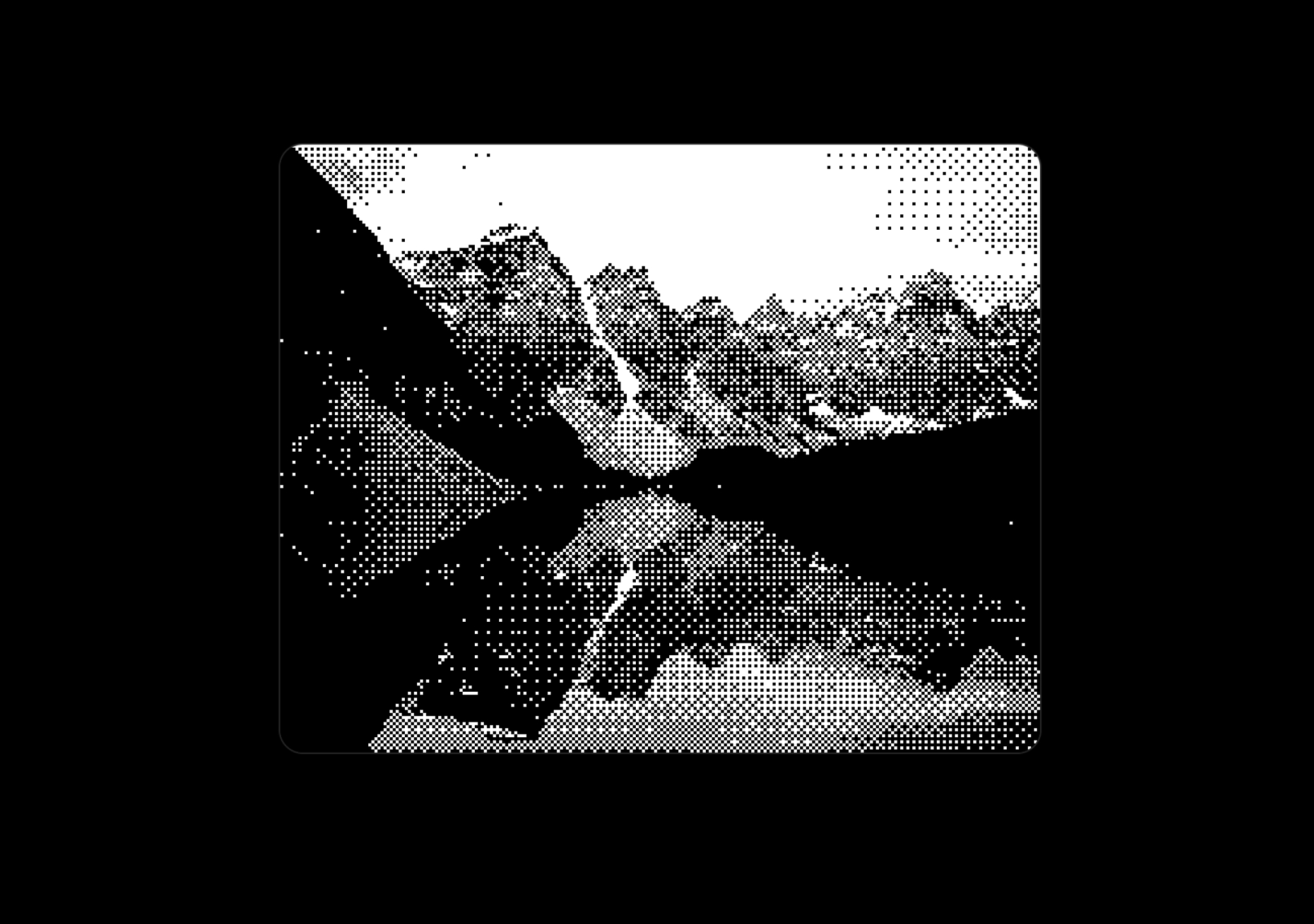
// components/ui/dither-shader.tsx
"use client";
import React, { useEffect, useRef, useCallback, useState } from "react";
import { cn } from "@/lib/utils";

type DitheringMode = "bayer" | "halftone" | "noise" | "crosshatch";
type ColorMode = "original" | "grayscale" | "duotone" | "custom";

interface DitherShaderProps {
  /** Source image URL */
  src: string;
  /** Size of the dithering grid cells */
  gridSize?: number;
  /** Type of dithering pattern */
  ditherMode?: DitheringMode;
  /** Color processing mode */
  colorMode?: ColorMode;
  /** Invert the dithered output colors */
  invert?: boolean;
  /** Pixelation multiplier (1 = no pixelation, higher = more pixelated) */
  pixelRatio?: number;
  /** Primary color for duotone mode */
  primaryColor?: string;
  /** Secondary color for duotone mode */
  secondaryColor?: string;
  /** Custom color palette array for custom mode */
  customPalette?: string[];
  /** Brightness adjustment (-1 to 1) */
  brightness?: number;
  /** Contrast adjustment (0 to 2, 1 = normal) */
  contrast?: number;
  /** Background color behind the dithered image */
  backgroundColor?: string;
  /** Object fit behavior */
  objectFit?: "cover" | "contain" | "fill" | "none";
  /** Threshold bias for dithering (0 to 1) */
  threshold?: number;
  /** Enable animation effect */
  animated?: boolean;
  /** Animation speed (lower = slower) */
  animationSpeed?: number;
  /** Additional CSS classes for the container (use this to set size via Tailwind) */
  className?: string;
}

// 4x4 Bayer matrix for ordered dithering
const BAYER_MATRIX_4x4 = [
  [0, 8, 2, 10],
  [12, 4, 14, 6],
  [3, 11, 1, 9],
  [15, 7, 13, 5],
];

// 8x8 Bayer matrix for finer dithering
const BAYER_MATRIX_8x8 = [
  [0, 32, 8, 40, 2, 34, 10, 42],
  [48, 16, 56, 24, 50, 18, 58, 26],
  [12, 44, 4, 36, 14, 46, 6, 38],
  [60, 28, 52, 20, 62, 30, 54, 22],
  [3, 35, 11, 43, 1, 33, 9, 41],
  [51, 19, 59, 27, 49, 17, 57, 25],
  [15, 47, 7, 39, 13, 45, 5, 37],
  [63, 31, 55, 23, 61, 29, 53, 21],
];

function parseColor(color: string): [number, number, number] {
  if (color.startsWith("#")) {
    const hex = color.slice(1);
    if (hex.length === 3) {
      return [
        parseInt(hex[0] + hex[0], 16),
        parseInt(hex[1] + hex[1], 16),
        parseInt(hex[2] + hex[2], 16),
      ];
    }
    return [
      parseInt(hex.slice(0, 2), 16),
      parseInt(hex.slice(2, 4), 16),
      parseInt(hex.slice(4, 6), 16),
    ];
  }
  const match = color.match(/rgb\((\d+)\s*,\s*(\d+)\s*,\s*(\d+)\)/i);
  if (match) {
    return [parseInt(match[1]), parseInt(match[2]), parseInt(match[3])];
  }
  return [0, 0, 0];
}

function getLuminance(r: number, g: number, b: number): number {
  return 0.299 * r + 0.587 * g + 0.114 * b;
}

function clamp(value: number, min: number, max: number): number {
  return Math.max(min, Math.min(max, value));
}

export const DitherShader: React.FC<DitherShaderProps> = ({
  src,
  gridSize = 4,
  ditherMode = "bayer",
  colorMode = "original",
  invert = false,
  pixelRatio = 1,
  primaryColor = "#000000",
  secondaryColor = "#ffffff",
  customPalette = ["#000000", "#ffffff"],
  brightness = 0,
  contrast = 1,
  backgroundColor = "transparent",
  objectFit = "cover",
  threshold = 0.5,
  animated = false,
  animationSpeed = 0.02,
  className,
}) => {
  const containerRef = useRef<HTMLDivElement>(null);
  const canvasRef = useRef<HTMLCanvasElement>(null);
  const animationRef = useRef<number | null>(null);
  const timeRef = useRef<number>(0);
  const imageRef = useRef<HTMLImageElement | null>(null);
  const imageDataRef = useRef<ImageData | null>(null);
  const dimensionsRef = useRef<{ width: number; height: number }>({
    width: 0,
    height: 0,
  });

  const [dimensions, setDimensions] = useState<{
    width: number;
    height: number;
  }>({ width: 0, height: 0 });

  const parsedPrimaryColor = parseColor(primaryColor);
  const parsedSecondaryColor = parseColor(secondaryColor);
  const parsedCustomPalette = customPalette.map(parseColor);

  const applyDithering = useCallback(
    (
      ctx: CanvasRenderingContext2D,
      displayWidth: number,
      displayHeight: number,
      time: number = 0,
    ) => {
      const canvas = canvasRef.current;
      if (!canvas || !imageDataRef.current) return;

      // Clear with background
      if (backgroundColor !== "transparent") {
        ctx.fillStyle = backgroundColor;
        ctx.fillRect(0, 0, displayWidth, displayHeight);
      } else {
        ctx.clearRect(0, 0, displayWidth, displayHeight);
      }

      const sourceData = imageDataRef.current.data;
      const sourceWidth = imageDataRef.current.width;
      const sourceHeight = imageDataRef.current.height;

      const effectivePixelSize = Math.max(1, Math.floor(gridSize * pixelRatio));
      const matrixSize = gridSize <= 4 ? 4 : 8;
      const bayerMatrix = gridSize <= 4 ? BAYER_MATRIX_4x4 : BAYER_MATRIX_8x8;
      const matrixScale = matrixSize === 4 ? 16 : 64;

      // Process pixels
      for (let y = 0; y < displayHeight; y += effectivePixelSize) {
        for (let x = 0; x < displayWidth; x += effectivePixelSize) {
          // Map display coordinates to source image coordinates
          const srcX = Math.floor((x / displayWidth) * sourceWidth);
          const srcY = Math.floor((y / displayHeight) * sourceHeight);
          const srcIdx = (srcY * sourceWidth + srcX) * 4;

          let r = sourceData[srcIdx] || 0;
          let g = sourceData[srcIdx + 1] || 0;
          let b = sourceData[srcIdx + 2] || 0;
          const a = sourceData[srcIdx + 3] || 0;

          if (a < 10) continue; // Skip fully transparent pixels

          // Apply brightness and contrast
          r = clamp((r - 128) * contrast + 128 + brightness * 255, 0, 255);
          g = clamp((g - 128) * contrast + 128 + brightness * 255, 0, 255);
          b = clamp((b - 128) * contrast + 128 + brightness * 255, 0, 255);

          // Calculate luminance
          const luminance = getLuminance(r, g, b) / 255;

          // Get dither threshold based on mode
          let ditherThreshold: number;
          const matrixX = Math.floor(x / gridSize) % matrixSize;
          const matrixY = Math.floor(y / gridSize) % matrixSize;

          switch (ditherMode) {
            case "bayer":
              ditherThreshold = bayerMatrix[matrixY][matrixX] / matrixScale;
              break;
            case "halftone": {
              const angle = Math.PI / 4;
              const scale = gridSize * 2;
              const rotX = x * Math.cos(angle) + y * Math.sin(angle);
              const rotY = -x * Math.sin(angle) + y * Math.cos(angle);
              const pattern =
                (Math.sin(rotX / scale) + Math.sin(rotY / scale) + 2) / 4;
              ditherThreshold = pattern;
              break;
            }
            case "noise": {
              const noiseVal =
                Math.sin(x * 12.9898 + y * 78.233 + time * 100) * 43758.5453;
              ditherThreshold = noiseVal - Math.floor(noiseVal);
              break;
            }
            case "crosshatch": {
              const line1 = (x + y) % (gridSize * 2) < gridSize ? 1 : 0;
              const line2 =
                (x - y + gridSize * 4) % (gridSize * 2) < gridSize ? 1 : 0;
              ditherThreshold = (line1 + line2) / 2;
              break;
            }
            default:
              ditherThreshold = bayerMatrix[matrixY][matrixX] / matrixScale;
          }

          // Adjust threshold with user setting
          ditherThreshold = ditherThreshold * (1 - threshold) + threshold * 0.5;

          // Determine output color based on color mode
          let outputColor: [number, number, number];

          switch (colorMode) {
            case "grayscale": {
              const shouldBeDark = luminance < ditherThreshold;
              outputColor = shouldBeDark ? [0, 0, 0] : [255, 255, 255];
              break;
            }
            case "duotone": {
              const shouldBeDark = luminance < ditherThreshold;
              outputColor = shouldBeDark
                ? parsedPrimaryColor
                : parsedSecondaryColor;
              break;
            }
            case "custom": {
              if (parsedCustomPalette.length === 2) {
                const shouldBeDark = luminance < ditherThreshold;
                outputColor = shouldBeDark
                  ? parsedCustomPalette[0]
                  : parsedCustomPalette[1];
              } else {
                // Quantize to closest palette color with dithering
                const adjustedLuminance =
                  luminance + (ditherThreshold - 0.5) * 0.5;
                const paletteIndex = Math.floor(
                  clamp(adjustedLuminance, 0, 1) *
                    (parsedCustomPalette.length - 1),
                );
                outputColor = parsedCustomPalette[paletteIndex];
              }
              break;
            }
            case "original":
            default: {
              // Apply dithering while preserving colors
              const ditherAmount = ditherThreshold - 0.5;
              const adjustedR = clamp(r + ditherAmount * 64, 0, 255);
              const adjustedG = clamp(g + ditherAmount * 64, 0, 255);
              const adjustedB = clamp(b + ditherAmount * 64, 0, 255);

              // Quantize to fewer levels for dithered look
              const levels = 4;
              outputColor = [
                Math.round(adjustedR / (255 / levels)) * (255 / levels),
                Math.round(adjustedG / (255 / levels)) * (255 / levels),
                Math.round(adjustedB / (255 / levels)) * (255 / levels),
              ];
              break;
            }
          }

          // Apply inversion
          if (invert) {
            outputColor = [
              255 - outputColor[0],
              255 - outputColor[1],
              255 - outputColor[2],
            ];
          }

          // Draw the pixel
          ctx.fillStyle = `rgb(${outputColor[0]}, ${outputColor[1]}, ${outputColor[2]})`;
          ctx.fillRect(x, y, effectivePixelSize, effectivePixelSize);
        }
      }
    },
    [
      gridSize,
      ditherMode,
      colorMode,
      invert,
      pixelRatio,
      parsedPrimaryColor,
      parsedSecondaryColor,
      parsedCustomPalette,
      brightness,
      contrast,
      backgroundColor,
      threshold,
    ],
  );

  // Setup resize observer for responsive sizing
  useEffect(() => {
    const container = containerRef.current;
    if (!container) return;

    const resizeObserver = new ResizeObserver((entries) => {
      for (const entry of entries) {
        const { width, height } = entry.contentRect;
        if (width > 0 && height > 0) {
          dimensionsRef.current = { width, height };
          setDimensions({ width, height });
        }
      }
    });

    resizeObserver.observe(container);

    return () => {
      resizeObserver.disconnect();
    };
  }, []);

  // Process image and apply dithering when dimensions or settings change
  useEffect(() => {
    const canvas = canvasRef.current;
    if (!canvas || dimensions.width === 0 || dimensions.height === 0) return;

    let isCancelled = false;

    const processImage = (img: HTMLImageElement) => {
      if (isCancelled) return;

      const dpr =
        typeof window !== "undefined" ? window.devicePixelRatio || 1 : 1;
      const displayWidth = dimensions.width;
      const displayHeight = dimensions.height;

      canvas.width = Math.floor(displayWidth * dpr);
      canvas.height = Math.floor(displayHeight * dpr);

      const ctx = canvas.getContext("2d");
      if (!ctx) return;
      ctx.resetTransform();
      ctx.scale(dpr, dpr);

      // Create offscreen canvas to get image data
      const offscreen = document.createElement("canvas");
      const iw = img.naturalWidth || displayWidth;
      const ih = img.naturalHeight || displayHeight;

      let dw = displayWidth;
      let dh = displayHeight;
      let dx = 0;
      let dy = 0;

      if (objectFit === "cover") {
        const scale = Math.max(displayWidth / iw, displayHeight / ih);
        dw = Math.ceil(iw * scale);
        dh = Math.ceil(ih * scale);
        dx = Math.floor((displayWidth - dw) / 2);
        dy = Math.floor((displayHeight - dh) / 2);
      } else if (objectFit === "contain") {
        const scale = Math.min(displayWidth / iw, displayHeight / ih);
        dw = Math.ceil(iw * scale);
        dh = Math.ceil(ih * scale);
        dx = Math.floor((displayWidth - dw) / 2);
        dy = Math.floor((displayHeight - dh) / 2);
      } else if (objectFit === "fill") {
        dw = displayWidth;
        dh = displayHeight;
      } else {
        dw = iw;
        dh = ih;
        dx = Math.floor((displayWidth - dw) / 2);
        dy = Math.floor((displayHeight - dh) / 2);
      }

      offscreen.width = displayWidth;
      offscreen.height = displayHeight;
      const offCtx = offscreen.getContext("2d");
      if (!offCtx) return;

      offCtx.drawImage(img, dx, dy, dw, dh);

      try {
        imageDataRef.current = offCtx.getImageData(
          0,
          0,
          displayWidth,
          displayHeight,
        );
      } catch {
        console.error("Could not get image data. CORS issue?");
        return;
      }

      // Initial render
      applyDithering(ctx, displayWidth, displayHeight, 0);

      // Setup animation if enabled
      if (animated) {
        const animate = () => {
          if (isCancelled) return;
          timeRef.current += animationSpeed;
          applyDithering(ctx, displayWidth, displayHeight, timeRef.current);
          animationRef.current = requestAnimationFrame(animate);
        };
        animationRef.current = requestAnimationFrame(animate);
      }
    };

    // If image is already loaded, reprocess it
    if (imageRef.current && imageRef.current.complete) {
      processImage(imageRef.current);
    } else {
      // Load the image
      const img = new Image();
      img.crossOrigin = "anonymous";
      img.src = src;

      img.onload = () => {
        if (isCancelled) return;
        imageRef.current = img;
        processImage(img);
      };

      img.onerror = () => {
        console.error("Failed to load image for DitherShader:", src);
      };
    }

    return () => {
      isCancelled = true;
      if (animationRef.current) {
        cancelAnimationFrame(animationRef.current);
      }
    };
  }, [src, dimensions, objectFit, animated, animationSpeed, applyDithering]);

  return (
    <div ref={containerRef} className={cn("relative h-full w-full", className)}>
      <canvas
        ref={canvasRef}
        className="absolute inset-0 h-full w-full"
        style={{ imageRendering: "pixelated" }}
        aria-label="Dithered image"
        role="img"
      />
    </div>
  );
};

export default DitherShader;Models & stability
Recommended models
Independent reproductions
 Open reproduction ↗
GLM-5.3 单次生成;Codex 人工修复运行依赖、必要源码及移动布局,未重新生成。桌面/手机真实渲染和资源检查通过;完整功能与视觉还原尚未全部验收。源码、截图和修复记录见复现出处。
Reproduction source ↗Keep exploring

Copy this TSX component source into an AI coding tool such as Cursor, v0, or Claude, and tell it this is the Aceternity UI 3D Animated Pin component. It can then wire it into your React project, and you can swap the copy, colors, and trigger parameters to reuse it.
Prompt
// components/ui/3d-pin.tsx "use client"; import React, { useState } from "react"; import { motion } from "motion/react"; import { cn } from "@/lib/utils"; export const PinContainer = ({ children, title, href, className, containerClassName…

Copy this TSX component source into an AI coding tool such as Cursor, v0, or Claude, and tell it this is the Aceternity UI 3D Globe component. It can then wire it into your React project, and you can swap the copy, colors, and trigger parameters to reuse it.
Prompt
// components/ui/3d-globe.tsx "use client"; import React, { useRef, useMemo, useState, useCallback, Suspense } from "react"; import { Canvas, useFrame, useThree } from "@react-three/fiber"; import { OrbitControls, Html, useTexture } from "…

Copy this TSX component source into an AI coding tool such as Cursor, v0, or Claude, and tell it this is the Aceternity UI 3D Marquee component. It can then wire it into your React project, and you can swap the copy, colors, and trigger parameters to reuse it.
Prompt
// components/ui/3d-marquee.tsx "use client"; import { motion } from "motion/react"; import { cn } from "@/lib/utils"; export const ThreeDMarquee = ({ images, className, }: { images: string[]; className?: string; }) => { // Split the image…
Same creator
Each detail page keeps the original result, the prompt, and retest evidence in one reading path.